Showing posts with label medicine. Show all posts

Review of PDF Expert by Readdle (for Medical students, Residents and Doctors)


Note: This article talks about an app for Apple's iPad.
Note 2: I would like to express a big thank you to Readdle for providing me with a review copy of PDF expert.
Note 3: I have no intention of expressing any kind of gratitude to Apple as I am yet to get anything from them for free or even low cost.

Once upon a time, as a medical student and a future aspiring physician you had to read numerous books. And then some more. Harrison's Principles of Internal Medicine (2 volumes, 4012 pages, 13.4 lbs!), Guyton's Physiology (1120 pages, 6.1 lbs), The CPS (2960 pages, 8.8lbs), Robbins & Cotran Pathologic Basis of Disease (1464 pages, 7 lbs), etc... The list is endless, but it has one thing in common: each of these books could easily become a deadly weapon or a weightlifters dream. Whichever one of the two options you will find more attractive, you will certainly hate carrying those books around to school, library or your favourite coffee shop. I can guarantee you will just as much hate reading them because of how difficult it is to keep one open and how blue and sore your hands or legs will become after having to the hold the book on your lap. As if the weight wasn't enough of a hurdle, you will very soon realize that the most frequent way you will read these books is by looking things up, not systematically combing from start to finish. But the whole process will take you hours and will be about 50% successful. You will soon stop counting the number of times you had a question; attempted to find the answer in the book; failed miserably; tried to throw the book in frustration; dislocated your shoulder during the attempt; fired up your browser and read the article on Wikipedia.

As most of you have probably heard, several universities, hospitals and government organizations, even the military, are starting to implement content management systems based on the iPad. And that is very good for Apple's stock, indeed. However, how can we, as medical students, residents and budding staff take advantage of the digital revolution?

In this review I'd like to go over my personal favourite and only application I use to read PDF's on my iPad (if you'd like to read about the Digital Age Setup for the Prepared Medical Student, click here), Readdle's PDF Expert.

If you fire up the App Store on your iPad, with the search for "pdf reader", this is what you get:

App Store listing for PDF reader, 406! titles

As you can see, you have 406 choices. Although some of them are free, even the first page gives you a good idea of the price range, which goes up to a steep 9.99$. Depending on personal preference, you can try out several apps. However, I feel that without trial versions I had to rely on reviews of these apps on the internet, not wanting to throw away money at 10$ chunks for an electronic test drive. The problem I experienced with all the reviews is that none of them actually addressed in detail my needs: details about the reading experience for large PDFs, annotating them in the context of medical education, and using the online storage synchronization features. Another interesting thing you will notice is the App I am touting as the best is not even in the top search list (it is on the 2nd page, though)

I don't pretend to have done an extensive review of all the apps to provide you with EBAS (Evidence Based App Selection), but most people would agree that there are only a handful of apps that have been reviewed and are considered to be the alternatives for PDF Expert. You can read the article on iMedicalApps (Part 1, Part 2). In my article I am not even mentioning names of other Apps, because all I want to do is to show you why I found PDF Expert to do exactly what I wanted it to do. I will not go over every bell and whistle (of which there are many) in the app.

Now, to the screenshot intensive part of the review.

Main screen aka Welcome Simplicity

PDF Expert main screen

I like the default screen because it is simple to use. The most important for me is to see the files inside the folder. With a very nice icon, most of the titles above are easily readable, with the most important info like size and date also readily apparent. You can also notice that longer names are cut off and unfortunately do not scroll. Maybe next update? (This view is of network storage from my Dropbox folder, however it is no different from viewing files stored locally on the iPad - an advantage in its own)

File edit screen

File edit screen with non-contiguous selection

Clicking the edit button in the top right corner will change the screen to the one pictured above. From within this screen I can easily perform typical file operations like select, move, delete and add folder. The second screenshot above depicts three non-contiguous files selected.

File edit dialog allowing you to rename, delete, share or view revisions

Clicking on the arrow to the right of the file in the edit mode brings up the pop-up menu above which allows you to rename the file, email it to a friend and surprisingly, pull out revisions of the file from Dropbox.

Connecting to Dropbox and keeping your docs UpToDate

Although I advocate for using the Dropbox sync method, simply because it has been working for me for several years without a hitch, as you can see from the screenshot below you can use a variety of services to satisfy your taste or space requirements. Even the most recent contender, Google Drive is already there.

Sync options available natively

After adding your favorite online storage, you have the option of either browsing it like a normal folder structure from within the network tab on left of the main screen or choosing to sync a whole folder to your iPad.

Sync folder screen

Choosing to sync the folder will add it to your home screen and mark the files inside with a little green sign indicating the files are being synced, not dissimilar to the one used by Dropbox on your computer. This makes for a consistent and simple workflow that doesn't require you to learn new things to start using PDF Expert. 

The other option you have is while browsing your Dropbox folder to simply tap a file you want to read and the following screen pops up.

Loading file progress bar

As the progress bar runs down to the end, the file you tapped opens up. One minor annoyance I have with this method is that the whole folder structure from you main Dropbox folder is recreated just for this one file. Eg. if your file is located in Dropbox -> Medical -> Useful articles -> To Read, then the folder Medical will appear on you main screen, inside will be Useful articles. You will have to click through to To Read in order to find the one PDF file you downloaded. I would have preferred to set a predefined folder to dump the downloads or simply store them on the main screen and let me reorganize it. 

Reading documents like a big boy

The most important part of the review, or the function this App was built for, is where it shines the most . With an easy tap, you remove all unnecessary elements, leaving only the text (Screen 1 below). As you flick pages, a brief reminder with the current/total page number appears and then fades so as not to interfere with your document (Screen 2 below).

The reading experience

Current/Total page reminder briefly appears at top left when you flip pages

 As I read multiple articles and books on my iPad, having essentially forgone getting physical medical textbooks, I realized that although it is doable to read without zooming, I feel like I am squinting. Depending on your sight and annoyance by not seeing well, you will either not care or love the simple but essential feature I am going to mention: persistent zoom. This means that the zoom level is maintained between pages as you are reading the article. Moreover, switching from bottom right corner brings you right into top left for continuous and coherent flow. Also, navigation is intuitive as well - all you have to do is tap the right or left part of the screen and zoom will scroll past the visible segment. Again, this means that in the typical two column article:
  • I zoom on the left most one
  • Scroll down it as if I was reading a webpage
  • When I reach the bottom, I tap the right side of screen and tap the top of screen to scroll back up (this last bit could have been automated by PDF Expert, unless you drag around the page)
  • I find myself at the top of the right column at the perfect zoom level, ready to scroll down
  • When I'm at the bottom of the right column, I tap right side again and find myself at the same zoom level on the next page over the left most column.
Another feature I greatly enjoy when reading lengthy documents is the support for bookmarks, you can click on the open book icon (see below) to show all the bookmarks and annotations in the document.


Annotation - Colour me Highlight

Depending on your learning style, you will rarely highlight a keyword in an article, or highlight everything that has ink in it. Well, digital can be a blessing to both groups. And the implementation of highlighting in PDF Expert is the reason why I decided to use it. It seems natural to me to be reading a book with the highlighter in my hand or nearby on the desk, ready to be used as I come across an important passage. What I've found with all other Apps is that you could only do one or the other - read or annotate, which did not make sense to me. When turning on highlighting in PDF Expert, you choose the highlighter and a color and then read your document. Holding your finger over text for a little bit longer than a simple drag will start the highlighter, brief taps, on the other hand, allow you to navigate and flip pages. Also worth mentioning, highlighting will snap to text, so if you are suffering from alcohol withdrawal while reading the article on PE management, your secret will be safe with PDF Expert. Also worth mentioning is your annotations will show up once you open up the file on your computer in Adobe or other PDF readers. Das is good! 

Let me reiterate, the simplicity of the highlighting feature in PDF Expert not only made me use it as my main PDF reader, but actually started me on annotating PDFs electronically. This allows me to open up a previously annotated PDF and flip through my highlights to quickly recall the gist of the article.

I obviously skipped many of the other annotation features, however, as I said, this is a practical review and not a user manual. Of some value is the note function that allows you to add those cute postet icons arbitrarily on the page with your text that appears in a popup when the icon is clicked.

The editing toolbar

Highlight colors rainbow

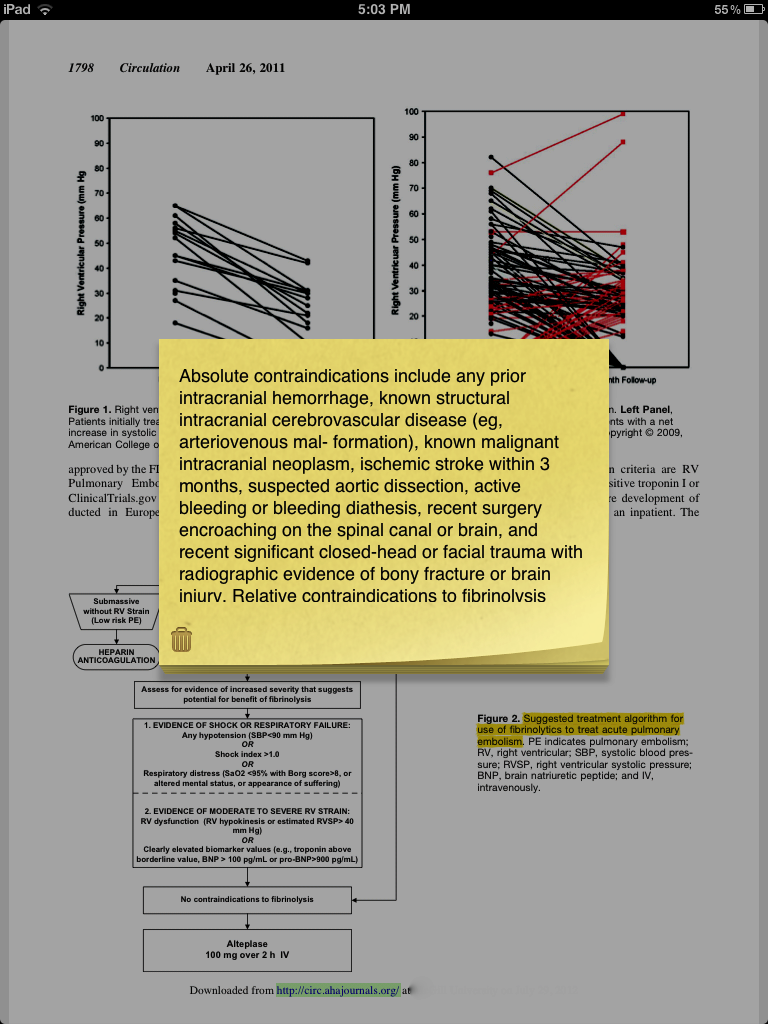
Add a note with a popup text


You can alternatively select the text in normal reading mode and then choose the edit you want to apply

Searching inside and outside

Searching is actually a twofold function. You can:
  • Search within a document
  • Search within your PDF Expert library. This search allows you to search either file names or file contents. 

Search and find within a file

Search all the files stored in PDF Expert

Editing documents

Once again, simplicity is the name of the game. All you have to do is open a document, and click on the 4 squares in the top menu bar. And boom! You can delete and rearrange pages as you like.


Bird's eye view on your document

Edit toolbar allows you to rearrange and delete individual pages

Security

This option will finds its admirers among researchers who store patient sensitive information on their iPad. Although PDF Expert does not seem to allow you to encrypt or protect files on an individual basis, it allows you to set a password to open up the app, which should prevent Curious George from snooping around your 20 year old healthy single DD+ breast implant patient database. 

Presenting your PDFs with a projector

This is a feature I am yet to use. Nevertheless, I feel like it has great potential. If you don't feel like paying Apple for Keynote just to avoid bringing your laptop to presentations (Please don't tell me you make presentations on your iPad - it has about the same level of sophistication as a two year old with a couple of crayons) then saving your presentations to PDF and loading them up to PDF Expert could actually also save you some change (no pun intended).

Forms

Again, I haven't used this feature, but it seems about borderline relevant to mention at the end. As you figured out from the subtitle, you can fill out forms. Now if you have a school/hospital/organization that fancies electronic PDF forms AND you have set up your iPad to print on your home printer (unless your employers also accept electronic forms, which is much rarer than just distributing them) then you are set to go for another feature adventure with the PDF Expert.

Closing remarks

In the tradition of this site, this review is biased, non-inclusive and very graphical. Despite that, I feel the utility of this program justifies the cost for any medical professional using an iPad. Although I would like some minor improvements in the App, like the reading flow automation when zoomed in and drag and drop support for moving files, the features one would buy the app for are simple and efficient. The best qualifier of the usefulness of this app is the fact I use it everyday for my articles, books and references.

I will update the review as I discover new features.

Everything you wanted to know about medical school but were afraid to ask me directly


The following is a growing set of questions you asked me. Well, technically, you asked Google, and Google told you to see me*. So here it is, without any particular order or priority.

Wisdom from Dr Patch Adams


I was very fortunate to be able to attend a lecture given by one the world's most caring doctors. He, who's name made Robin Williams 20 million dollars, he who told us that he could not stand his first year in peds because his view of medicine was so staggeringly different. I am, of course, talking about Dr. Hunter Campbell Adams, more commonly known as Patch Adams.

Although there were many great things in that speech, I wanted to share a couple because of their impact on me personally.

Choosing a medical specialty

It is an unfortunate truth of experiential reality that choices are not clear-cut, and the event window for choice may vanish before the information enabling the choice is present.

Eluki bes Shahar

For those lucky enough to have the need to contemplate this...


Ref: http://aggiepie.files.wordpress.com/2008/05/12medicalspecialtystereotypesfull.jpg


Ref: http://www.huffingtonpost.com/dr-peter-rost/want-to-become-a-doctor_b_20148.html (via BMJ?)


All jokes aside, researching which specialties you prefer early on in your medical school years has its advantages. These include the pre-clinical years as much as the later, more exciting time spent in the hospital rotations.

For pre-clinicals, you will want to get a mentor who practices in the specialty you are interested in. This will allow you to be in the hospital early on, with no pressure to perform. You'd be surprised how much you will notice when you are not concerned with evaluations/patient responsibility. You also, more importantly, get to see the "collective body" of the specialists. There are definite stereotypical traits attributable to some specialties more than to others. The common example would be a more commanding or dominating personality for surgery. Does that mean you cannot be a calm, mellow surgeon? Absolutely not! But the law of life is that you will find it much harder to be the exception.

For the clinical years, there is a lot more to do. For example, if you decide to aim for dermatology, you might want to make sure you get an invitation to Stockholm for their annual ceremony, or at least put in the extra effort to beef up your application. Another example would be doing extra electives at rural sites to get experience in self-reliance for a great career in family medicine. If you like a particular program, it is usually good to get an elective there. According to CaRMS, some universities openly state they have preferential treatment for people with whom their faculty is familiar from such electives.

For a competitive specialty, you would probably want to get involved in research in a related field. The reasons are twofold. Firstly, what better way to put your foot where your mouth is when it is time to back up your claim of interest in the specialty. Some elite residency programs in the States require you to have done research, published, or even to have a Msc degree. Secondly, don't neglect the opportunity to get to know the program director of your Oh-So-Desired-Specialty if you get a summer grant in their lab/hospital clinic. Although I will elaborate on it in later post, I would caution you from molecular biology research unless you absolutely love it and know exactly what you want to do. Most likely you are going to be a practicing clinician, so stick to the clinical.

Some residencies, it turns out, are more competitive and select from an extensive pool of medical graduates for a minute number of spots. You'll immediately recognize that this early preparation for one critical point in your life vaguely reminds you something...However, your competition just received a serious upgrade from the last time you had to prove you are better than the average Joe to the medical school admissions committee.

And finally, some serious tools:
  • Careers in Medicine via AAMC (usually your career advising office will email you a password)
  • Medical Specialty Aptitude Test
  • The Ultimate Guide to Choosing a Medical Specialty via Amazon
    (The best book I found on the subject, although by no means perfect. In fact, much of it is focused on US specifics, which are somewhat irrelevant for hardcore Canadians like us. Don't feel insulted if you are from outside of Canada, I did mention in the prelude to this blog that I write for and about Canadian medical school applicants/students)
  • Your colleagues in upper years. Corner one and question them about their rotations in a given specialty. If you are extroverted enough, you could probably get away with leeching on to them for a day in the hospital. From my experience, there is much more amicability and much less cut-throat attitudes in medical school than there are in premed.

The MCAT will change


Before I talk about the changes, I would like to digress for a little bit. Although the MCAT season is almost over, quite a few of my good friends have either just recently come back from AAMC-land or will be going there soon. With so much MCAT in my life this summer, despite my strong desire to erase the memories of my own test taking, I felt a post about the elephant in the room was appropriate. I am sure that either you or somebody around exclaimed at least once "This MCAT is stupid! It tests all those little things. Why on Earth would I need to know the Krebs cycle or Heisenberg's uncertainty principle? If this is the case, the following article would soothe your mind and clear your conscience if you had spent time studying for it.

The Ups and Downs of Applying for Medical School


Today is a special occasion, because we have a guest post. P.L. has written about his hurdles with what is the main theme of the day on my blog, 24/7/356. Please be kind, constructive and critical - leave comments, so he might write again... (remark by premedc)
--

I’m sure most of you have heard the expression “Being a doctor isn’t easy”. Doctors not only have to work crazy hours, not only are they responsible for the lives of their patients, but they have to do all of this and at the same time manage their time effectively so that they can have time with their family and friends. Easy right? Well I’m sure the fact that the divorce rate for physicians is 10-20% higher than the general population is a testament to exactly how difficult it really is. But the purpose of this post is not to dissuade you from wanting to be a physician or to tell you about the hardships that physicians have to face, because the reality is that you are not physicians yet. Instead I’m going to talk to you about the application process to medical school and how some future physicians learn how hard their job is before even being accepted to medical school. I will be talking to you about my own experiences applying to medical school and maybe you can learn something worthwhile from my wild roller coaster ride.

on the future and MMIs

It has been a while since I had last posted, but the reason is as always - I had been too busy. Well, time to catch up a bit. I felt like sharing some of personal the news for those of you who have been following me since the beginning (others are welcome to read, but if you skip I will not send the Dark Knight of Death with a rusty ax after you, you have my word. Also, you will not lose any precious advice, since I just mumble about my humble self this time).

So, the news (trumpets, please): In late March I will be doing the MMI interview at one of the best Canadian Medical Schools (this, let alone midterm exams, has been keeping me quite busy).

As a forecast for this blog, I can predict at least one or two more posts about the MCAT, after which I will start a series about submitting your applications. These will talk about writing a killer CV, an exquisite autobiographical letter/sketch, and making sure you don't screw up with references.

Then I will follow up with interview preparations, tips, hints, my own experience and more stuff about the MMI. I hope to cover everything from what you should wear to how to answer the mean/odd/unexpected questions.

Later, albeit out of chronological order, I will be talking about extracurricular experiences, my own and other peoples', research, sports, etc. I will try to get somebody who had done each one of these to describe it in their own words.

Finally, this blog will have 2 possible outcomes. Very soon I will know whether I got in or not. If I do get in, I will (and here I am a bit hesitant whether to get a new blog or keep posting to this one) start posting about my life as a med student. If I do not get accepted, I will keep writing about "getting in" as I struggle one more year until I do get in. Some things are just meant to be. One wants to think.

Stay tuned.

Free MCAT tools


Happy New 2009 Year!

I thought it is only fair to start a new year with free tools to master the MCAT. So what do I have in store? You probably will have come across some of the things I will mention. Some, I hope, will be a pleasant surprise. In any case, I do believe a budget solution is possible for the MCAT. So let us get started.

Yaaaay! Freebies.

The MCAT books

Today's post will talk about the books I used to prepare for the MCAT. I will not promote books I have not had, but I will make recommendations based on my knowledge. Please take note of the previous post's suggestions about self-discipline required for the use of books.

1. Kaplan MCAT Premier book

This was my master book. I believe you should get a book like this because it will allow you to prepare specifically for the MCAT as apposed to just boost your knowledge say, for a college test. If you read my previous posts, you are aware I am strongly against prep companies' ripoff courses. However, I do believe that they did a pretty good job at gathering info from many sources in one place thus saving you an enormous amount of time. Most importantly, I am convinced that for ~100$ this book (along with the other items below and my study strategy) is superior to an almost 2000$ course.

MCAT Strategies

Studying

As an aside to the following information: I have received my MCAT scores a couple of days ago, and I can gladly say that the practice AAMC tests have a strong predicting accuracy.
-------------------------------------
Today's post will be mostly about the broad strategies of preparation for the MCAT.

As you probably know, two major components determine whether or not you make the cut for the interview. These are your GPA and your MCAT score. There are books written on how to study efficiently and every university will have an undergraduate advising office that would be more than happy to justify its existence by helping you out with your studying. Today, however, we are going to talk about the other component, the MCAT.

Needless to say, there is no person on earth that would like to re-take this test (except maybe the guys who teach prep courses, so they can claim numerous successes). Let alone the financial toll it will have on you, the psychological damage your neurons will sustain is irreversible. So how can you prepare for this horrendous test?

McGill University - tips and quick facts series

McGill Medical Buildings
Updated in 2010
Here is the stuff that will get you brownie points with the admission committee:
  • Some affiliated teaching hospitals:

    • McGill University Health Centre (MUHC), representing five teaching hospitals affiliated with McGill:

      • Montreal Children's Hospital
      • Montreal General Hospital
      • Royal Victoria Hospital
      • Montreal Neurological Hospital and Institute
      • Montreal Chest Institute
    • Sir Mortimer B. Davis - Jewish General Hospital
    • Douglas Institute
    • St. Mary's Hospital Centre
  • McGill's unique Simulation Centre
The McGill Medical Simulation Centre is an interprofessional centre of excellence using medical simulation to enhance the skills of health care professionals through education, research, evaluation and innovation, thereby improving patient safety and the quality of care.front1
The Centre combines training techniques from high-risk professions in aviation and emergency response with the latest medical simulation technologies. Fully integrated into McGill's professional programs, the Centre provides the next generation of doctors, nurses, physiotherapists and occupational therapists with hands-on training in difficult and potentially dangerous procedures without risk to patients. It also promotes the importance of teamwork in health care delivery.
Established health care professionals are also able to take advantage of the Centre for the professional upgrading that will be increasingly required by licensing bodies. (http://www.mcgill.ca/medsimcentre/about/)
  • McGill's e-Curriculum
The M.D., C.M. program is committed to making use of electronic media, multimedia learning objects and information technology in learning and teaching. In recognition of the wide variety of learning styles evident in our students, it is considered important to provide as broad a range of educational resources as possible. The Faculty of Medicine at McGill was very fortunate to have received, in 1997, a major donation from the Molson foundation for the development of computer enhanced learning and teaching methodologies. Since then, the faculty has converted major components of the mainstream curriculum to an electronic format, and enhanced the curriculum with multi-media learning objects (e.g. animations, audio and video clips, etc.) to facilitate teaching and learning. (http://curriculum.mmi.mcgill.ca/)
If you want a preview this cool e-stuff, check out this link http://curriculum.mmi.mcgill.ca/viewflash.aspx?path=~/images/ECurriculumDemo-800x600.swf&w=800px&h=600px
  • From this year on, McGill will have MMIs (Multiple Mini-Interviews), just like McMaster. There are 9 MMI interviews each lasting 10 minutes total (2 minutes for reading the prompt + 8 minutes for actual situation) and a single traditional type interview that last 10-20 minutes long. The weight of these MMI`s is significant - 80% versus 20% the rest - which means that if you got to that point, you better give it all you can.
  • McGill has recently introduced a new category of Mature applicants who have completed an undergraduate degree and have been out of the academic world for at least 3 years. They have slightly different criteria (most notably lower GPA requirements). Read more here: http://www.mcgill.ca/medadmissions/applying/applicant-categories/non-traditional-pathway-quebec
  • McGill has rather complete details about their GPA and MCAT (unless you are an international applicant, McGill does NOT, I repeat, DOES NOT require the MCAT) requirements over here: http://www.mcgill.ca/medadmissions/what-are-we-looking/academics-university
  • McGill has recently introduced the so-called physicianship program in their curriculum. I would highly recommend you read the following:


    Here is some more general info about medical education:

    Université de Montréal - tips and quick facts series

    A couple of interesting things that might be helpful during your interview:

    • Since 1999 to 2006, University of Montreal medical graduates had the highest performance on the Licencure exams of the Canadian Medical Counsil (required to be taken by every graduate before being able to work in Canada). [link]
    • Hospital affiliation is among the largest in Canada. Here is a partial list:
    Centres hospitaliers universitaires (CHU)
    • CHUM - Centre hospitalier de l'Université de Montréal
    • CHU - Centre hospitalier universitaire Sainte-Justine
    Centres affiliés universitaires (CAU)
    • Hôpital du Sacré-Coeur de Montréal
    • Hôpital Maisonneuve-Rosemont
    Instituts universitaires (IU)
    • Institut de cardiologie de Montréal
    • Institut universitaire de gériatrie de Montréal
    Centres hospitaliers affiliés (CHA)
    • CSSS Sud-Ouest-Verdun
    • Centre hospitalier régional de Trois-Rivières
    • CSSS Laval
    • CSSS de Chicoutimi
    • Hôpital Louis-Hippolyte Lafontaine
    • Hôpital Rivière-des-Prairies
    • Institut de réadaptation de Montréal
    • Institut Philippe-Pinel de Montréal
    • APP (Apprentissage par problème) teaching method. Puts emphasis on self-directed learning, problem solving and team work. Students are split into small groups and participate in controlled discussions.
    • As of  2008, University of Montreal has picked up the trend and has MMIs (Mini Multiple Interviews). According to their website: 8-10 stations, each with a situation, 2 minutes to read the situation, 8 minutes to perform it, with an actor and an evaluator.
    • Beautiful Campus in Montreal

    NOTE: If you know anything I should add to this list, please contact me through the top right sidebar link. I will be happy to add your advice so everybody else can benefit. Please do not post it in the comments.

    Choose your medschools carefully


    Choosing which schools you will spend your precious time on is a worthwhile effort if you are to get from point A to point M(edical School X). This will both save you time and increase your chances of success. Unless you print money, I do not see a lot of sense in applying blindly everywhere, just because you can. This strategy can seem fail safe, but in the long term you will realize that you have a brain for a reason, and in most real life situations you cannot go 'all out'. That is where prioritizing comes to play. Priorities are the determining factor when you are wondering about going out on that weekend trip with your buddies instead of learning translational motion equations or the anatomy of the nervous system.

    So, let us get started on priorities. To choose schools you will have to have stringent criteria. Here are some of the most obvious ones:

    • Tuition. Plain and stupid : can you pay for it if you get in? While, of course my dear mate, what could be easier? Nevertheless, take a calculator (a pen and a paper if you are studying for the MCAT - yes, I am that obsessed) and jot down your annual tuition fees, ancillary fees, equipment fees, possible relocation fees and cost of living. Make sure you double check it with somebody who has an understanding of living on their own. Budgets tend to seem simpler than they are when you are cut loose...
    • Do THEY need you? This relates to all the limitations each school can impose. For example, applicants to McMaster Medical School outside the welcoming province of Ontario enjoy a 10% quota of the available places. Will this limit your chances? Hmmm
      This also includes the GPA/MCAT/EC requirements. Make sure you are at least at the threshold in every category. Although in that case your chances might be slim and you would have to have a special achievement to blow the admissions office out of their comfortable leather chairs. In the good sense, that is.
    Canada enjoys 17 medical faculties total, which I list below in no special order:

    Over the next weeks I will try to get some useful insider info about each and every one of those. Note: This will be info you cannot usually find on the websites listed above.

    Planning your timeline


    Planning a timeline is not necessary but will make your life much easier if done properly. Rest assured, planning ahead of time for as much as three years requires a lot of insight into the intricacies of the process (which I have briefly outlined in the previous post) and is thus very hard and time consuming.

    Like most things tagged high importance in your life, timeline planning requires making mutliple attempts,with subsequent revisions improving. You will see the progress as time goes on . That said, if you do not start, there will be no progress at all.

    As a sample, below is a modified timeline Kaplan recommend using:


    36-18 months before the start of school (md):
    • Take free practice MCATs (Kaplan, Princeton Review, others that came with your study books)
    • Gather school info
    • Develop a target school list
    24-16 months before the start of school (md):
    • Register for the MCAT
    • Dedicate at least 2 months of studying
    • Do the MCAT
    20-12 months before the start of school (md):
    • Go to your student service, see what resources your university offers with premed applications.
    • Set deadlines with referees
    • Write your personal statement
    • Complete and submit applications
    • Investigate financial aid options
    12-3 months before the start fo school (md):
    • Prepare for interviews
    • Visit campuses
    Inasmuch as this example could be applied to a real plan, it is obviously limited by lack of details and some important points. Remember, the quality of your planning will be directly proportional to the investment you make in it.

    You need to have a plan

    Unlike true geniuses, most of us, mortals, have to plan things out when we attempt something as complex as medical school application. That is, of course, if we want to be successful. I cannot overemphasize that you will not get anywhere near a medical faculty unless you have a plan, your dad owns Switzerland or you discovered the cure for AIDS and cancer.

    Assuming you are in the same category as me, let me tell you a couple of things about planning for md applications.

    First of all, you have to do it early. What do I mean by early? Answer this question: Did you already start planning? A 'no' means you are already late. Seriously, start as soon as you can. I am only stressing this because more time means more opportunities. As you will see yourself, taking advantage of every opportunity you get is a must and will make the difference between you and ... well, most other people who will get rejected. Also, some extracurriculars require time to accomplish, the MCAT requires at least 3 months worth of studying (off academic year) etc. I personally think that the ideal time is the beginning of your first year in university.

    Now that you are getting doubts about whether you should have strated earlier, let me talk about a couple of things you need to consider including and elaborating on in your plan (I will go into excruciating detail about each one of them in later posts).
    1. Your story. The best example I can give for the visual people is a secret agent's secret identity for a mission. No, I am not living in one of Bourne's movies, but this is probably the best analogy I could come up with. By a story I mean a coherent narrative with logical sequence of your accomplishments. Basically, whatever you do in life (jobs, recreation, volunteering, etc) needs to fit in this story.
    2. Choosing schoools. Most of the following points will concentrate on things specific to each school. It will make your life much easier to make a list of schools you want to apply to, and then do the following items of your plan for each school.
    3. Your CV. This is the nitty-gritty details, the hardcore of your story. You will most likely need to submit some form of CV to most schools.
    4. Autobiographical essay. This one is the condensed, written form of your story. Many schools will ask you a question through which you will have to develop your story. Some will simply ask the 'Why' questions.
    5. Your references. You will need to provide academic and non-academic references, whether you want it or not, you will have to find a way to distinguish yourself from the 300-800-1200 students in your class to make sure the professor will remember you.
    6. Interviews. Med faculties are starting to experiment with the mini-interviews. Are you prepared for them? Can you tell me your weaknessess without looking awkward or making me think you will fail everything you'll start?
    7. MCAT. Believe me, you will need preparation for this beast. There is a lot I have to say about this one, since I am taking it this fall (2008). As I mentionned already, you will need a good 2-3 months dedicated specifically to studying for the MCAT.
    A good thing would be to make a timeline. Outlining when you are doing what is important for your motivation, execution and, of course, gratification. In the next post, I will give the example Kaplan uses for the timeline planification.